Bitlime
A crypto exchange that doesn't make you feel like a trader.
The task
Design a mobile app where people can buy, sell and track crypto, for everyone from first-time investors to active traders.
The problem
Big exchanges are built for people who already trade.
A beginner opens the app and sees too many buttons, words like P2P, Spot or TRC20, and a home screen that shows everything at once. Even the first deposit takes about 10 steps, and it's easy to get lost on the way.
Research
Who it's for
I described five types of users: investor, trader, beginner, business owner and student. They all want speed, safety and low fees. Beginners also want guidance, traders want more tools.
| Investor | Trader | Beginner | Business owner | Student | |
|---|---|---|---|---|---|
| Who | Michael, 45 | Sofia, 30 | Daniel, 25 | Omar, 35 | Lucas, 20 |
| Spending power | High | Medium | Low | High | Low |
| Motivation | Grow and diversify capital | Earn on short-term trades using technical and fundamental analysis | Start investing and learn how the market works | Diversify investments and use crypto in the business | Interest in new tech and earning on crypto growth |
| Expectations | Fast operations, reliability, security, portfolio reports | Up-to-date market data, analysis and forecasting tools | A simple, clear interface and learning materials | Market analysis tools, integration with other financial tools | Low fees, a chance to learn, a fresh approach |
What users told me
I talked to two people who already use crypto exchanges:
- They liked simple interfaces and learning materials.
- They didn't like high fees and complicated apps.
- They chose a new app based on ease of use, fees and security.
- Before switching, they worried about fees and about how support works.
Both are experienced users, so I took beginners' pains from the journey map and the competitor review.
Competitors
I compared Binance, Bybit and Bitget screen by screen. They are built almost the same way. The main difference is how much they show at once. Binance asks for a role on the first screen, but none of them shows a newcomer what they get before signing up.
| Binance | Bybit | Bitget | Bitlime | |
|---|---|---|---|---|
| First screen | Choose a role | Choose exchange or Web3, demo trading, search | Sign-up and a news pop-up | Preview of the account with a locked balance, demo trading, favorite pairs |
| Sign-up | Email or phone, Google, Apple, Telegram, corporate account | Email or phone, Google, Apple, Telegram, confirmation code | Email or phone, Google, Apple, Telegram, bot check | Email or phone, Google, Apple, Telegram |
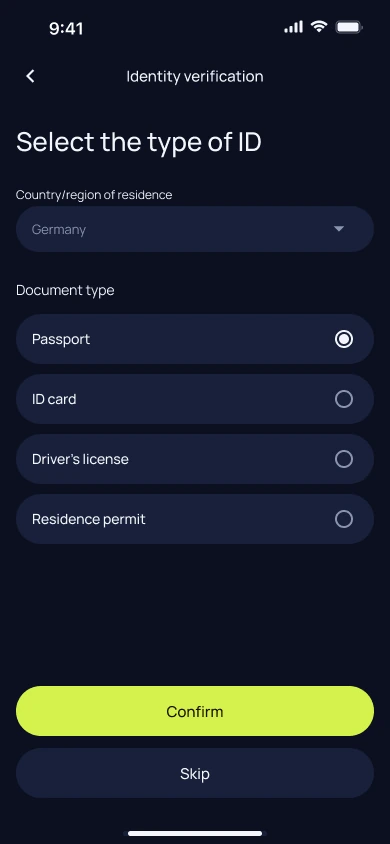
| Verification | Passkey | Country, document type, document photo | ID type, country, document photo, face recognition | A checklist up front, then country, ID type, document photo, selfie and address |
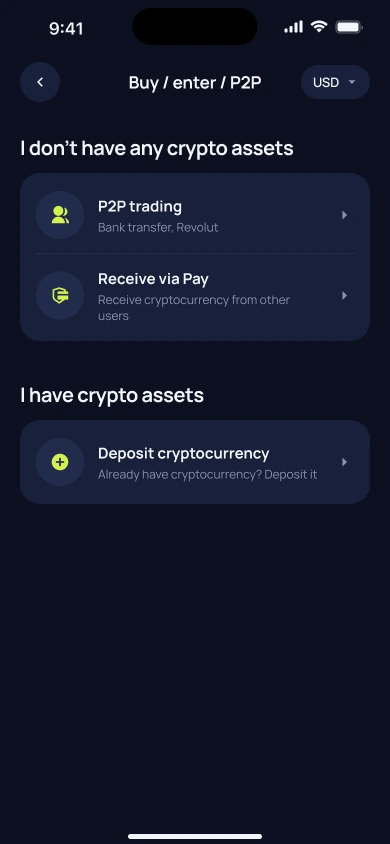
| Deposit from Home | Deposit, Pay or P2P → coin → network → address | Buy / Deposit / P2P → payment method → amount → coin → network → address | Deposit → card, P2P or exchanger → coin → address | Buy / Deposit / P2P → method → coin → network with min. amount and arrival time → address |
| Assets | Overview, Spot, Earn and Deposits tabs, spot history | Balance, hide assets, send, transfer, convert | Spot wallet and transaction history | One balance card with a chart and asset split, Deposit, Send, Transfer, hide-balance mode |
User journey
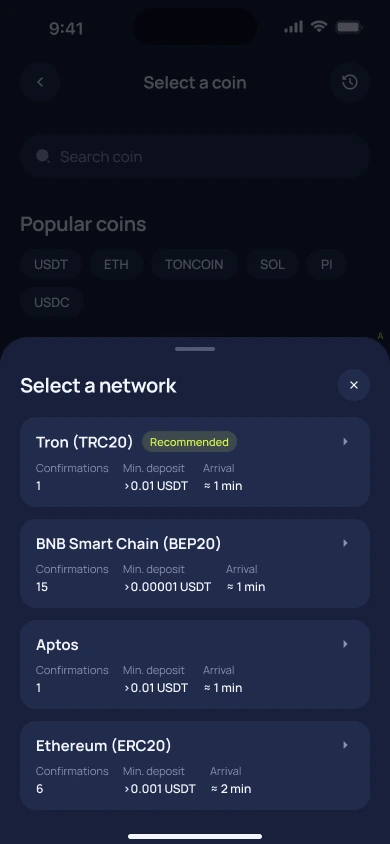
I walked through the path from opening the app to the first deposit and noted every question and problem. The hardest step was choosing a network: you only see names, with no minimum amount, no arrival time and no easy way back.
| 1. Choose role | 2. Sign up | 3. Home | 4. Buy method | 5. Coin | 6. Network | 7. Address | 8. Top up via wallet | 9. Check deposit | |
|---|---|---|---|---|---|---|---|---|---|
| Doing | Pick beginner or experienced | Enter email or phone | Open Home | Pick "I don't have crypto" or "I have crypto" | Find and pick a coin | Pick a network | Copy the address | Open a wallet and paste the address | Assets → Wallet → Spot → History |
| Asks | Do I have crypto experience? | Can I sign in without email? | How do I deposit crypto? | Pros and cons of each? Do they work in my country? Different fees? | How do I find it? Which one if I don't know them? | Which one? Minimum amount? Arrival time? | Why do I need it? What next? | Can I go back to another coin? Where are the fees? | Where is the deposit history? |
| Pain points | Why choose at all? | How many more steps before I can buy? | The Deposit button is easy to miss | No explanation of P2P, no hint when a feature isn't available, too much info | Hard to tell what a coin is for | Only names, unsupported networks shown, no way back | Have to open a browser and look for a wallet | Not sure it's safe, afraid to share card details | Don't know where to tap |
| Ideas | Let experienced users skip onboarding, show basics to beginners | Google, Apple and Telegram sign-in, show the number of steps | Make it bright and the only accent on the screen | Short explanation under each option, hint when unavailable | Market data tab, filter, search, recent coins | Only supported networks, details pop-up, easy way back | A button that opens a list of wallets | Return to Home automatically after the exchange | Fewer steps, hints to find sections fast |
Structure
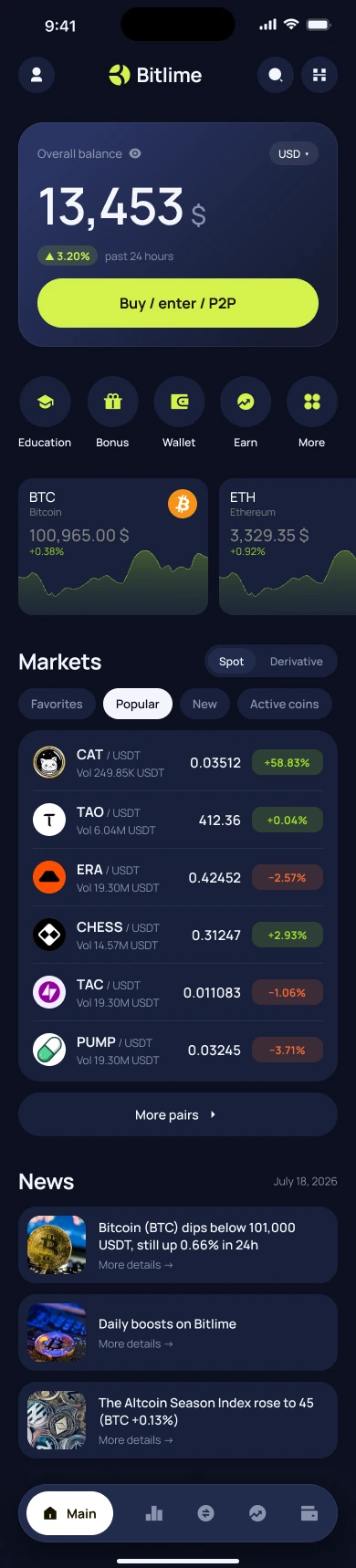
Five tabs: Home, Markets, Trade, Earn and Assets, plus a Profile. Every flow is split into small steps instead of one crowded screen, and first-time actions get a short tip.
Before sign-up
- Account preview with a locked balance
- Starter pairs
- Demo trading
Sign-up / Log in
- Email or phone
- Google, Apple, Telegram
- Password reset
Verification
- Checklist
- Country and ID type
- Document photo
- Selfie
- Address
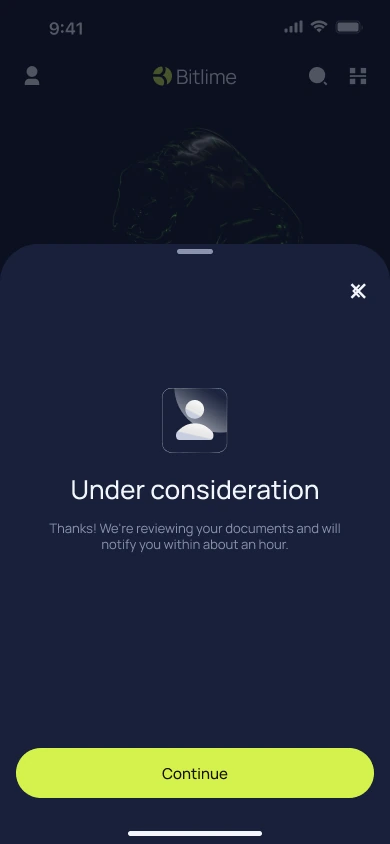
- Under review
Home
- Buy / Deposit / P2P
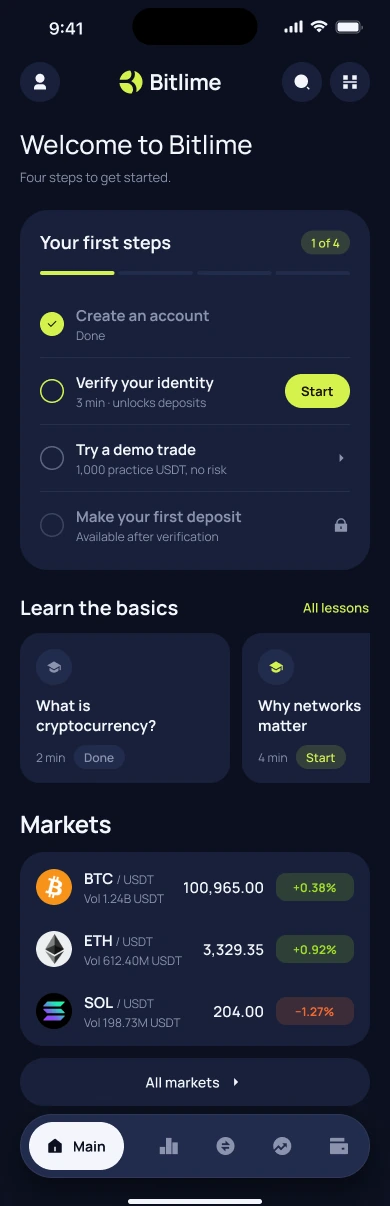
- First steps for beginners
- Education
- Earn
- News
- Search
Deposit and P2P
- Method
- Coin
- Network
- Address
- Status and history
- P2P buy and sell
- Receive via Pay
Markets
- List, Favorites, Gainers
- Data
- Fear & Greed
- Order flow
- Pair page
- Chart
- Flow of funds
Trade
- Spot: limit and market
- TP/SL
- Order confirmation
- Open orders
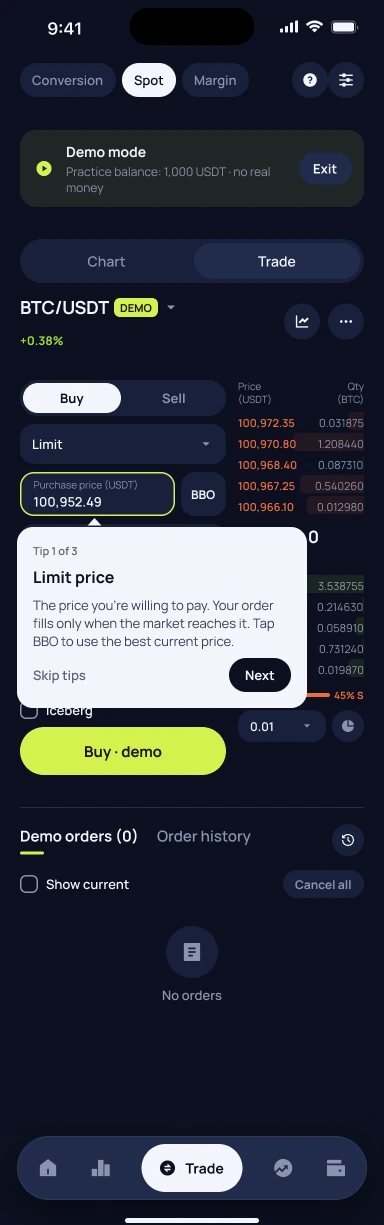
- Demo mode with tips
Earn
- Staking
- Stake
- Position
- Unstake
Assets
- Accounts: Spot, Earn, Margin, Funding
- Send
- Transfer
- Withdrawal history
- Conversion
Profile
- Account information
- Edit profile
- Settings
- All functions
Solution
First entry and Home
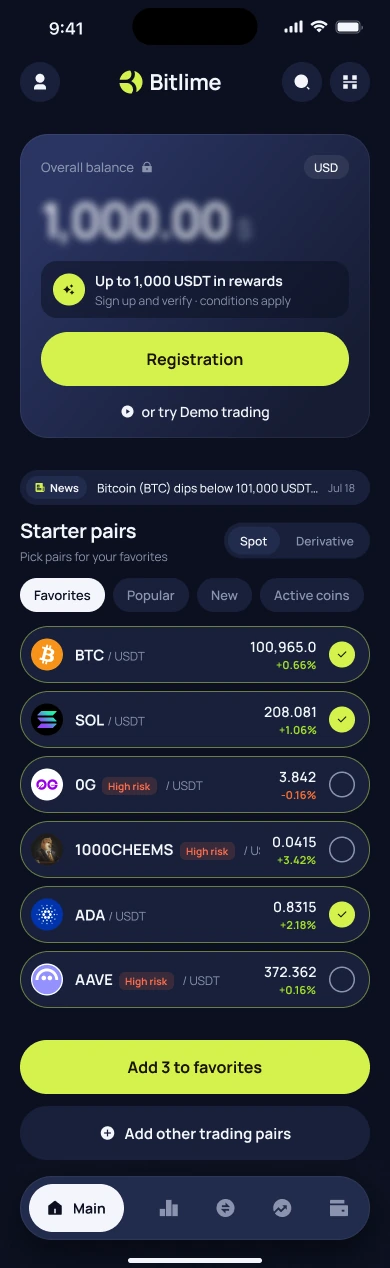
Before signing up, the user sees what their account will look like: a locked balance, a reward of up to 1,000 USDT, one Registration button and an option to try demo trading. They can also pick starter pairs for their favorites right away.
Instead of asking for a role, this screen works for both: beginners see the reward, experienced users can go straight to demo trading.
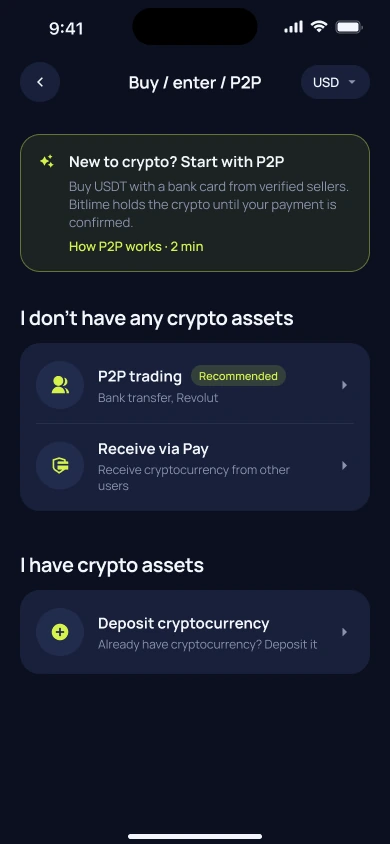
On Home, the main action, Buy / Deposit / P2P, is the biggest button on the screen, because in research users couldn't find it.
Beginner path
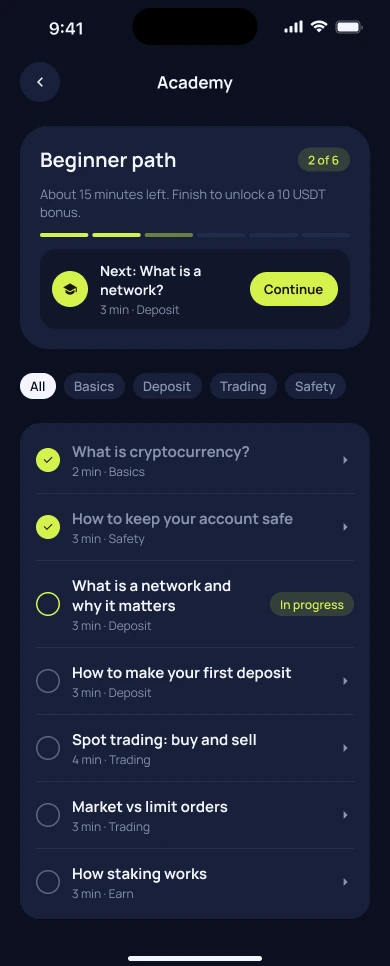
Beginners' pains from the journey map turned into one guided path from the first screen to the first trade.
- See the accountA preview with a locked balance and a reward, before any sign-up.
- Follow the checklistHome shows four first steps: account, verification, demo trade, first deposit.
- Learn the basicsAcademy has a beginner path of six short lessons, about 15 minutes, with a 10 USDT bonus at the end.
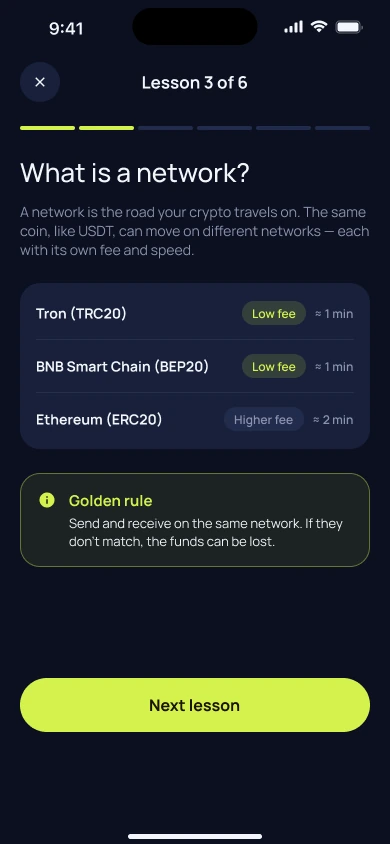
- Make a first depositThe method screen recommends P2P to people with no crypto and explains how it works. The lesson about networks comes right before the deposit.
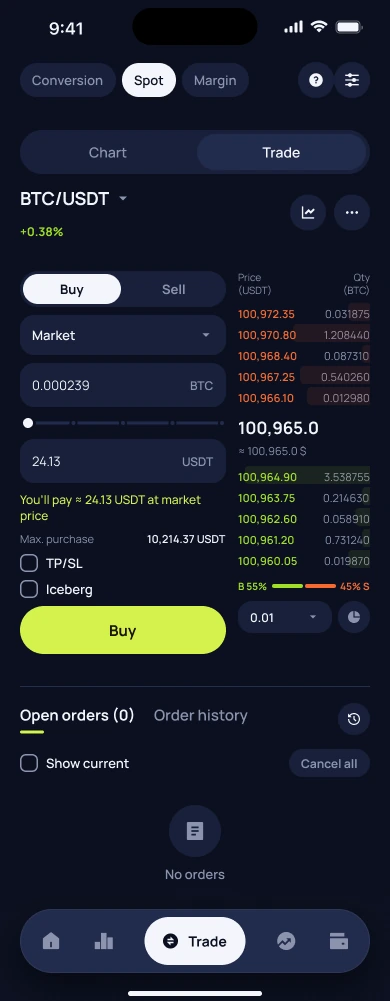
- Try a demo trade1,000 practice USDT and three tips that explain the trade form. A market order shows how much you will pay before you tap Buy.
- Get a tip at risky momentsThe first P2P order, TP/SL, stake and withdrawal each show one short warning in plain words.
Registration and verification
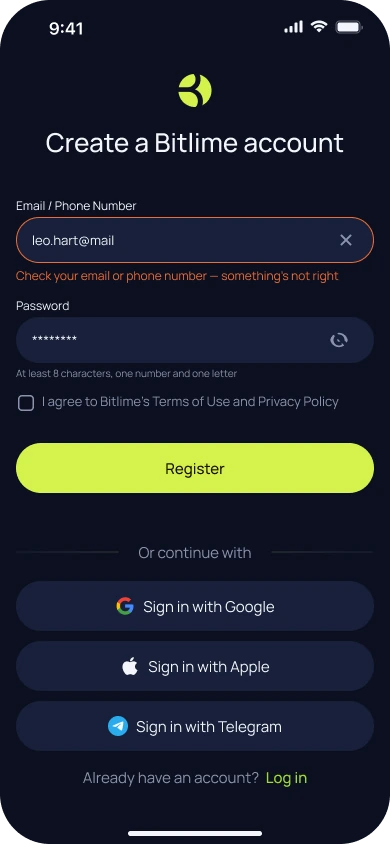
Short forms, clear error messages and sign-in with Google, Apple or Telegram.
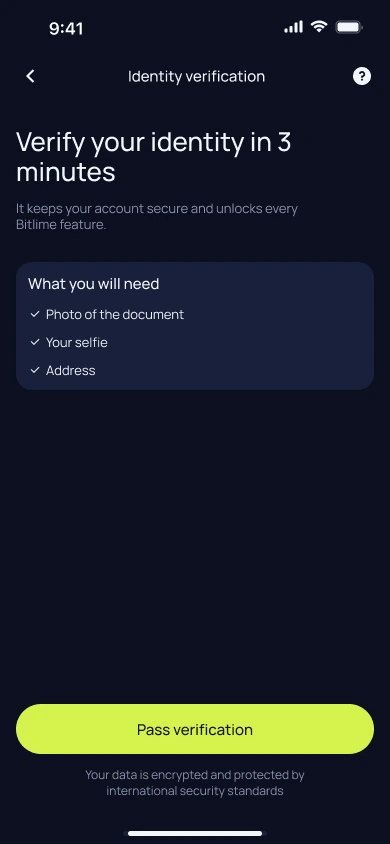
Verification starts with a checklist of what you need and how long it takes, and ends with a clear status: when to expect an answer.
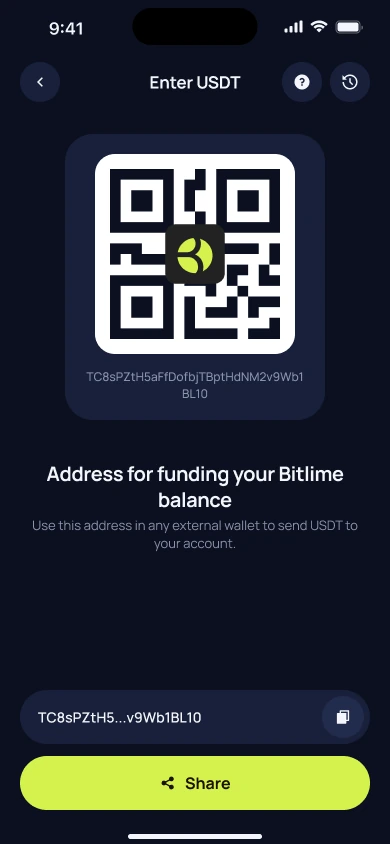
Deposit in four steps
Each step answers a question users had:
- Choose a methodEach option has a short explanation.
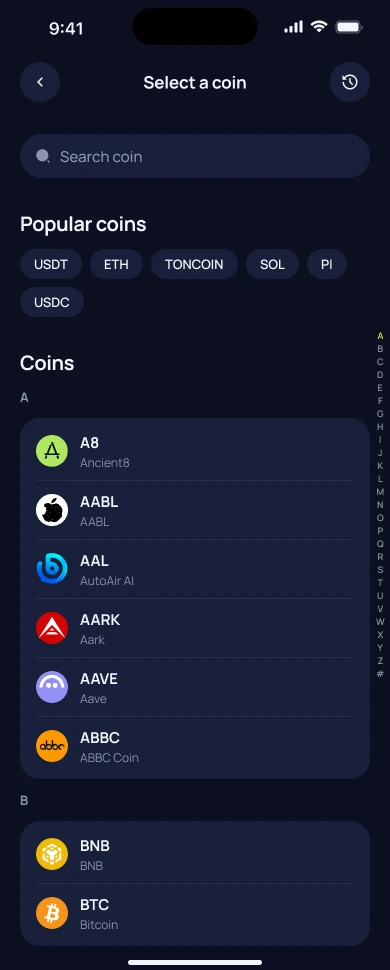
- Pick a coinPopular coins and search.
- Pick a networkConfirmations, minimum amount and arrival time for each.
- Send to the addressQR code, copy and share.
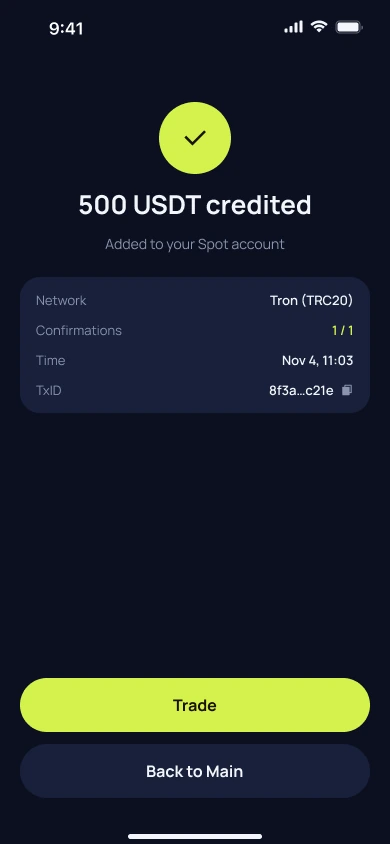
After the deposit, a status screen shows the network, confirmations and transaction ID.
P2P
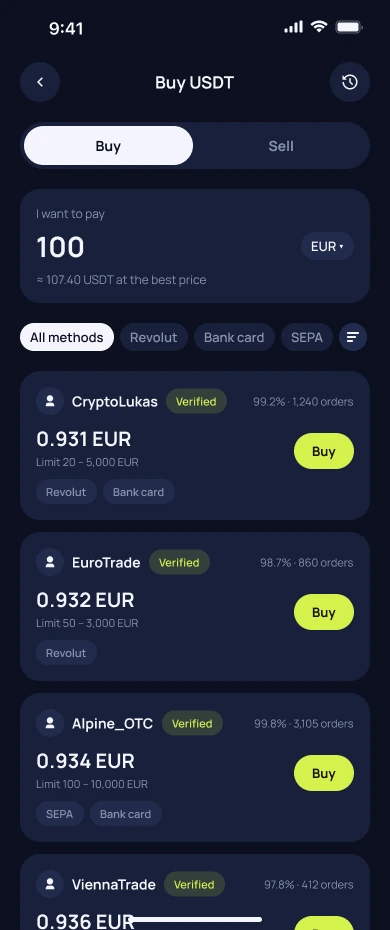
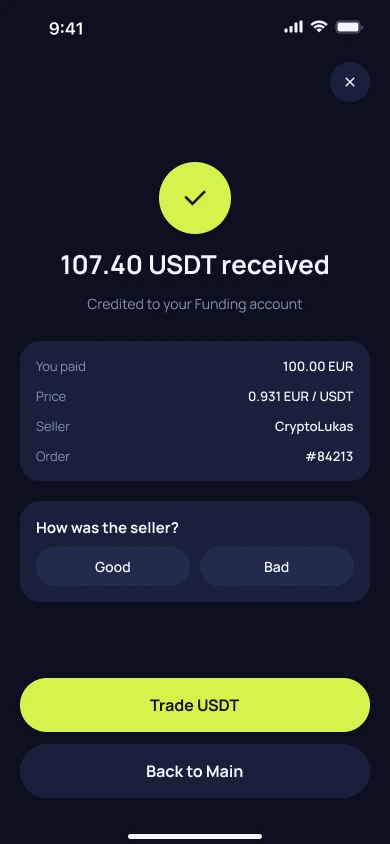
The user enters how much they want to pay and sees how much USDT they get at the best price. Sellers can be filtered by payment method and show a verified badge, completion rate and limits.
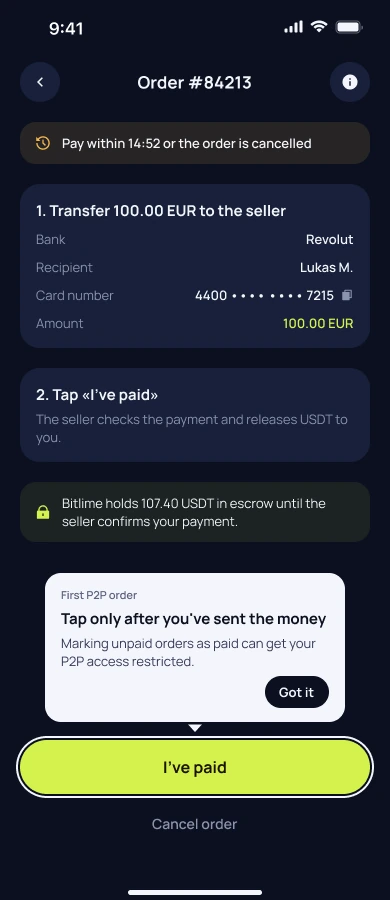
The order screen lists the payment details step by step, with a timer and a note that Bitlime holds the crypto until the seller confirms. On the first order, a tip warns to tap "I've paid" only after the money is sent.
Trade
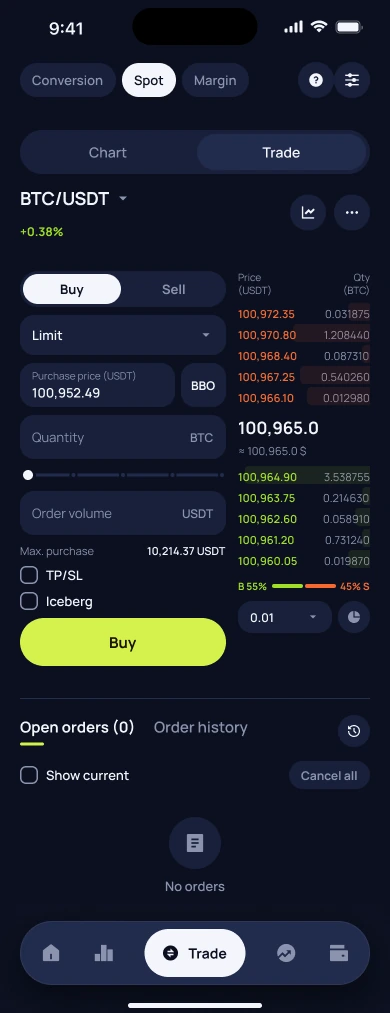
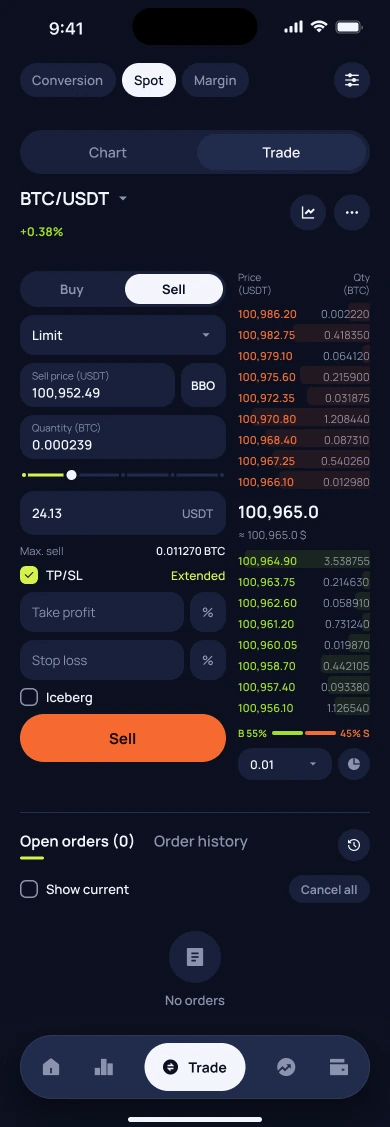
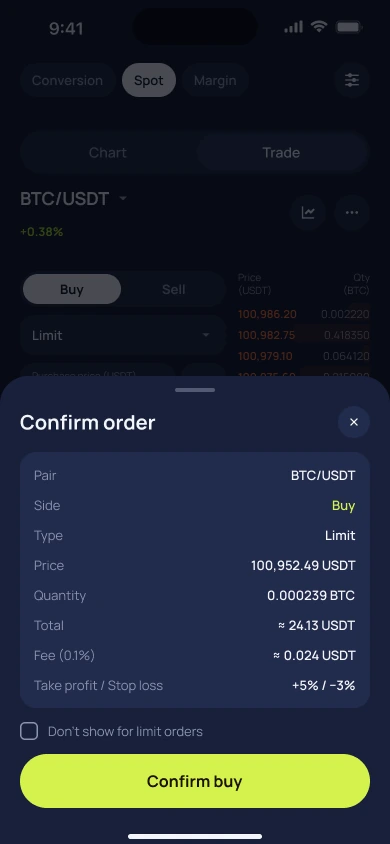
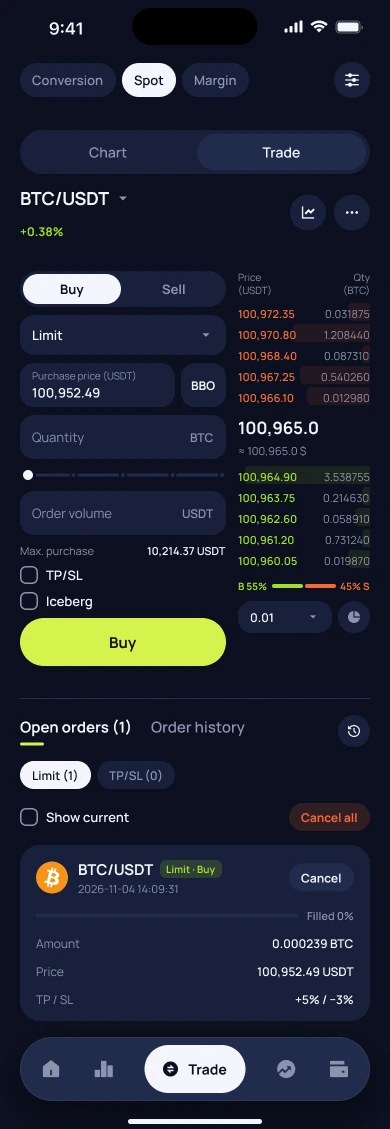
A simple buy/sell form next to the order book. Before a limit order is placed, a confirmation sheet shows the total and the fee. Open orders show how much is filled.
Markets
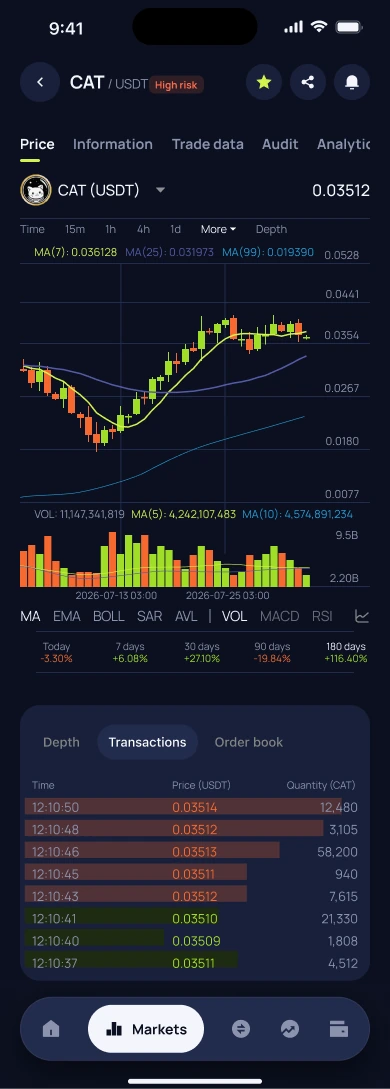
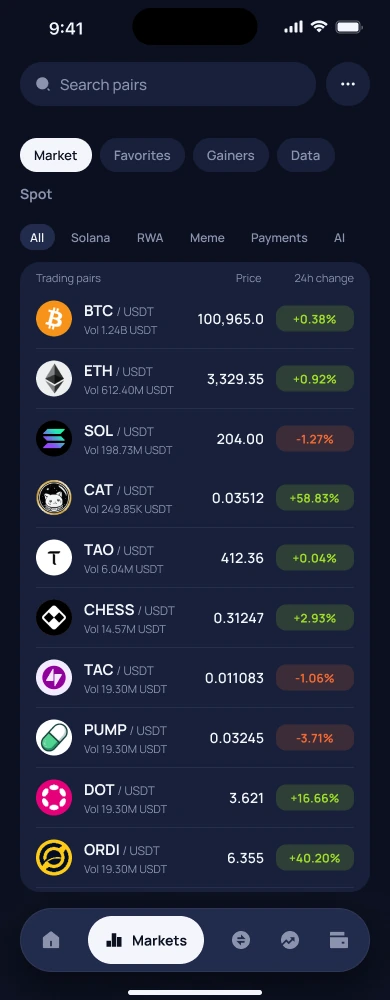
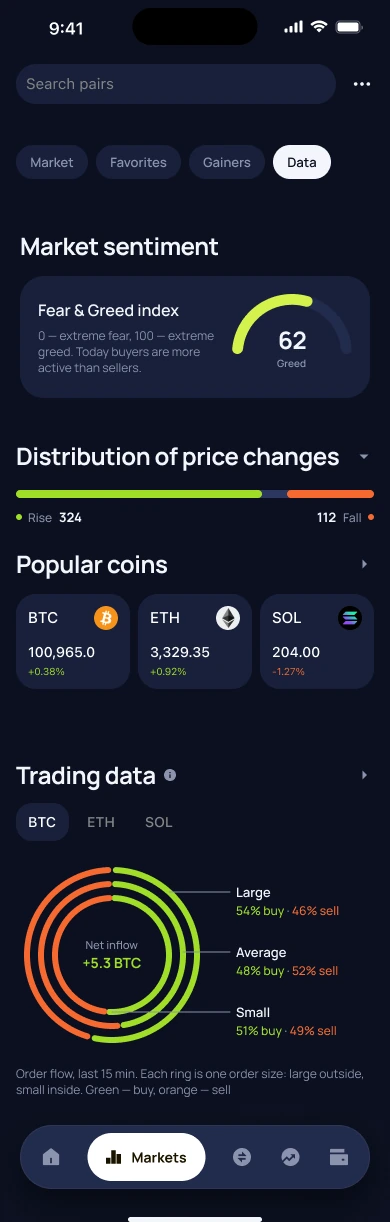
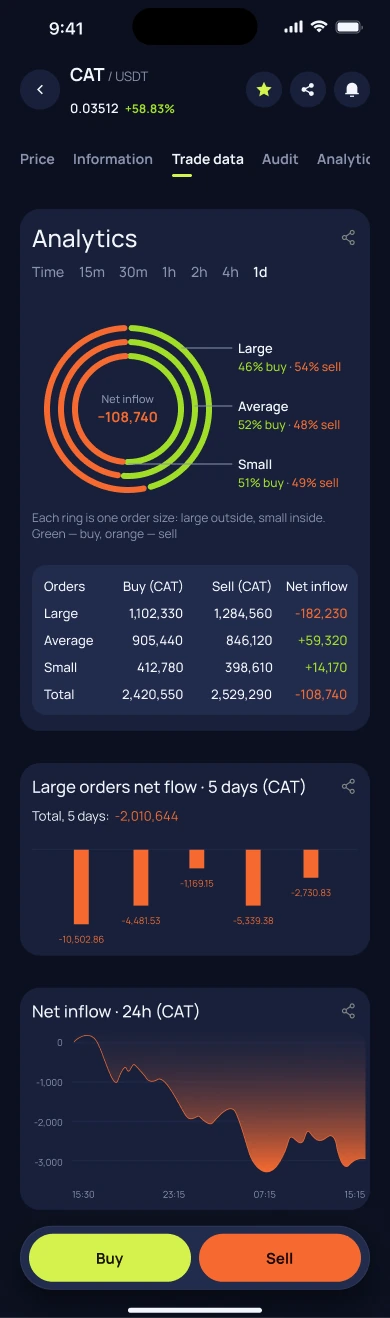
The market list can be filtered by sector. The Data tab shows the Fear & Greed index with an explanation, how many coins went up or down, and order flow for BTC, ETH and SOL.
The pair page has a candle chart with moving averages, volume and recent trades. Flow of funds shows who is buying and selling: each ring is one order size, green for buy and orange for sell, with net inflow in the center. Below are the exact numbers and the net flow of large orders over 5 days and 24 hours.
Earn
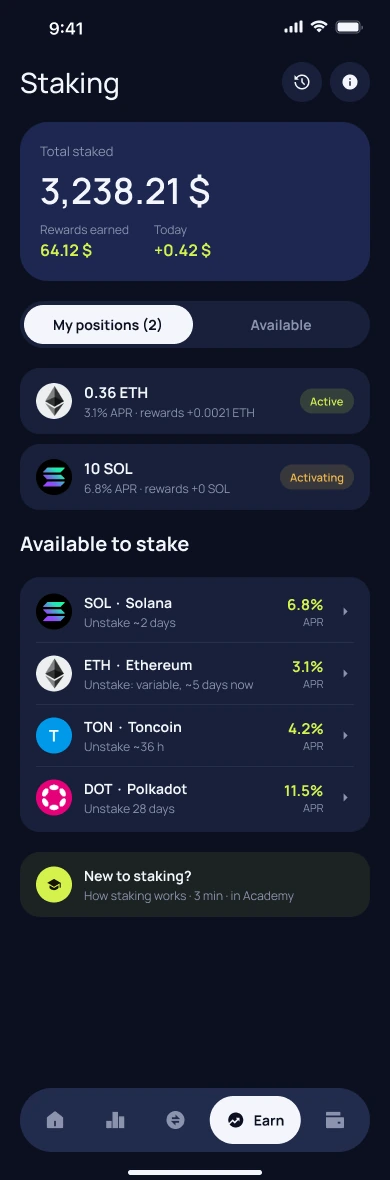
One screen with the total staked, rewards earned and your positions with their status. Each coin shows its APR and how long unstaking takes.
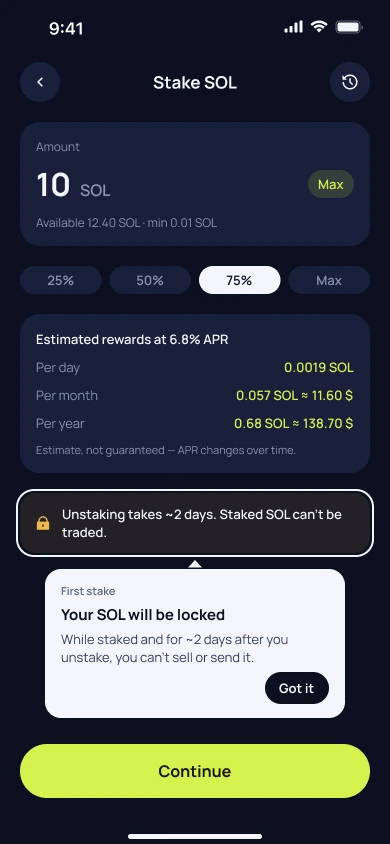
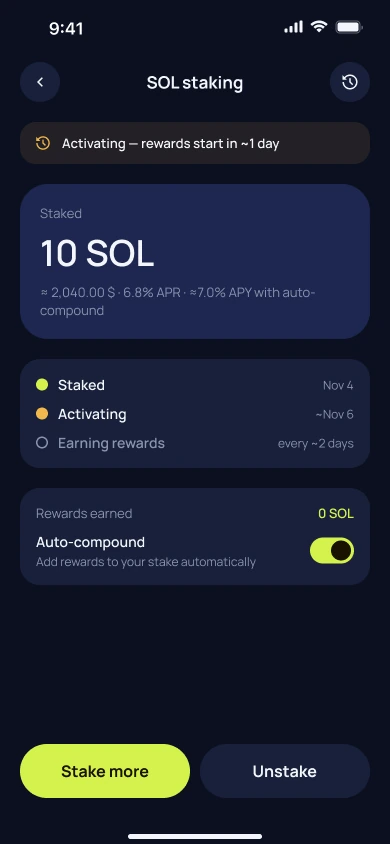
Before staking, the user sees estimated rewards per day, month and year. On the first stake, a tip warns that the coins are locked while staked and for about 2 days after unstaking. The position screen shows what happens next: staked, activating, earning rewards.
Assets
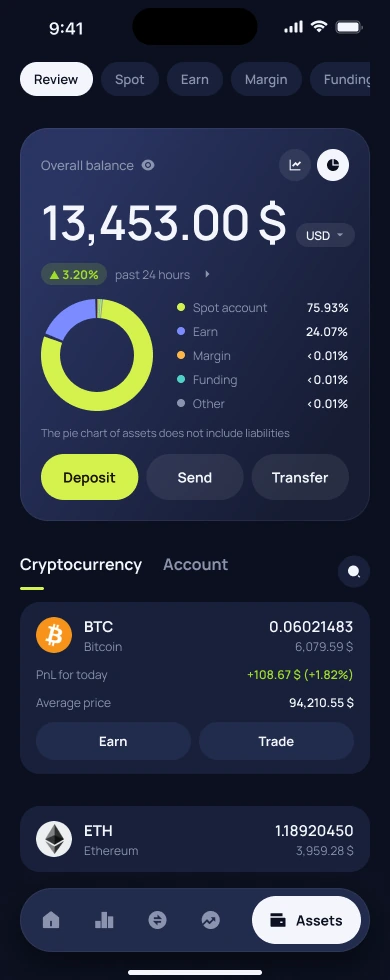
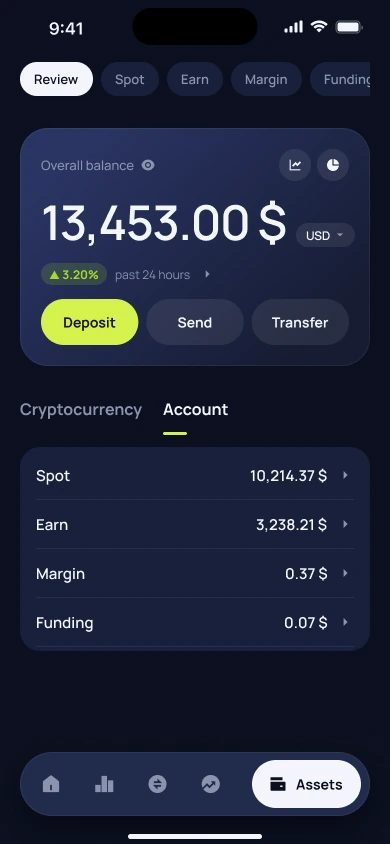
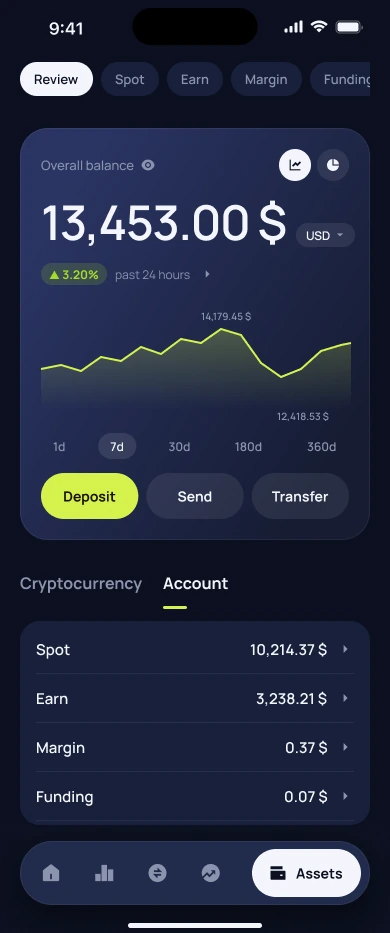
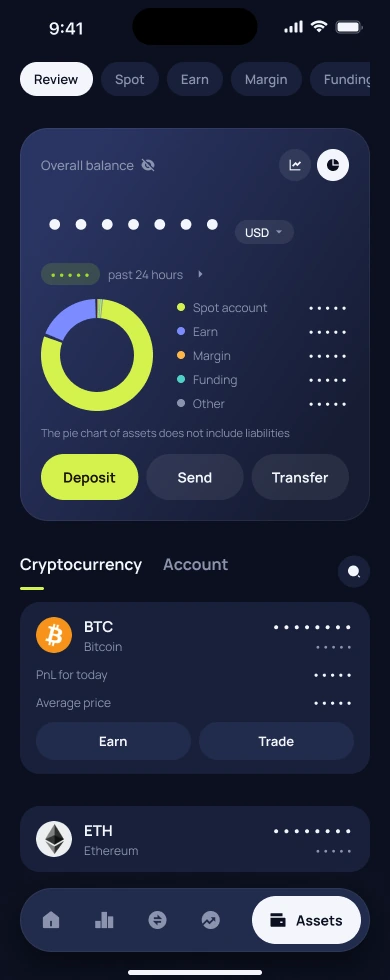
One card with the total balance, a chart or asset split, buttons for Deposit, Send and Transfer, and a hide-balance mode. Below, the balance by account (Spot, Earn, Margin, Funding) or by coin, with today's PnL and average price.
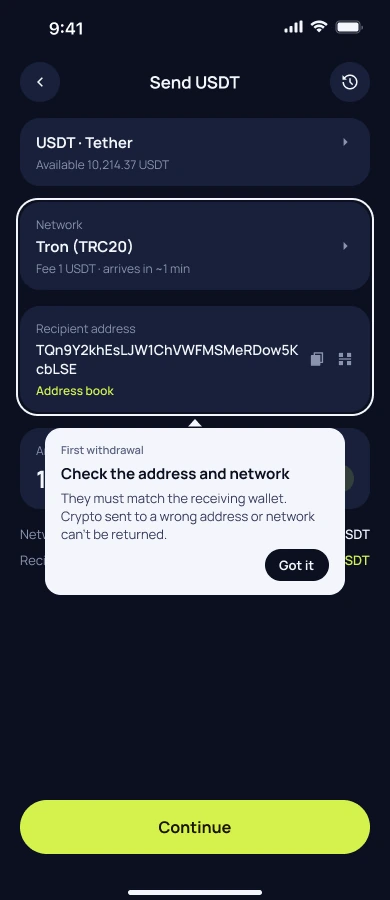
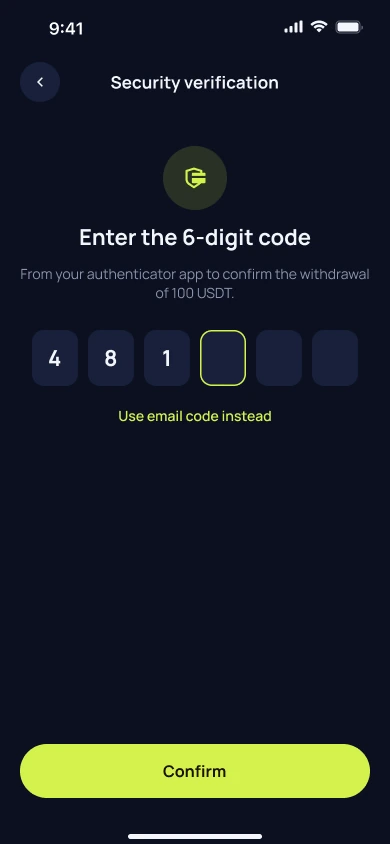
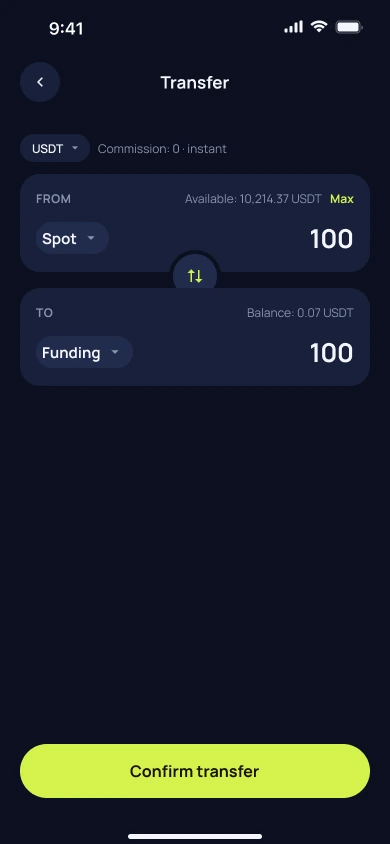
Send shows the network fee and arrival time, warns on the first withdrawal that a wrong address or network means the funds are lost, and asks for a 2FA code. Transfer moves money between accounts instantly with no commission.
Profile
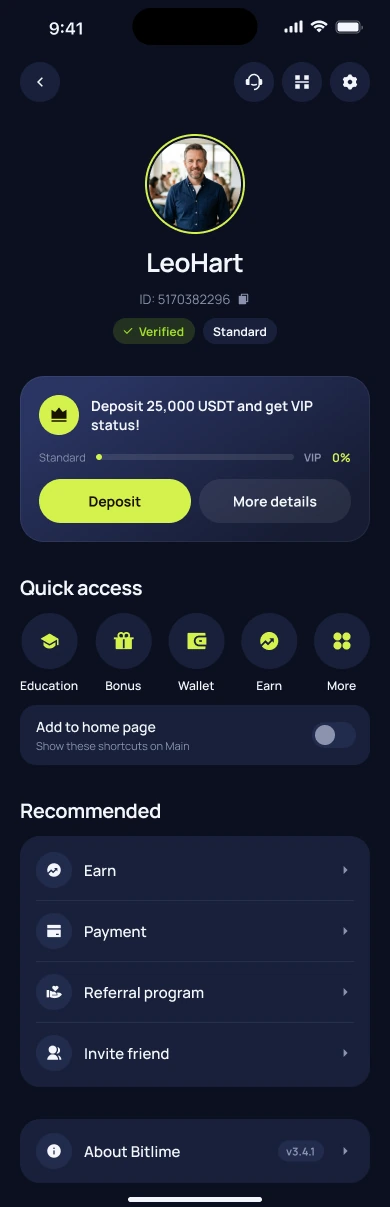
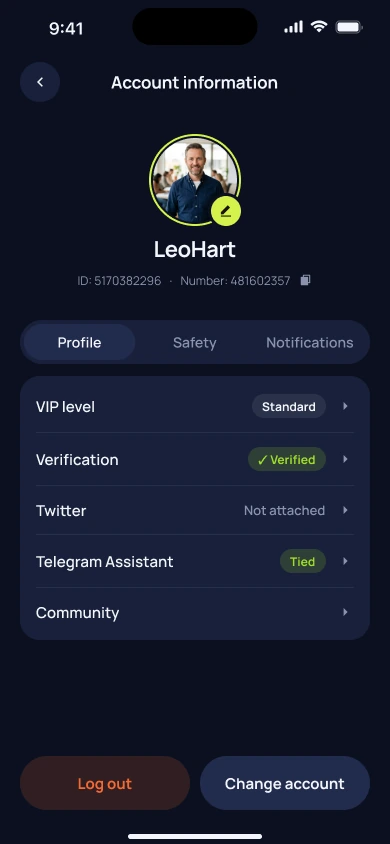
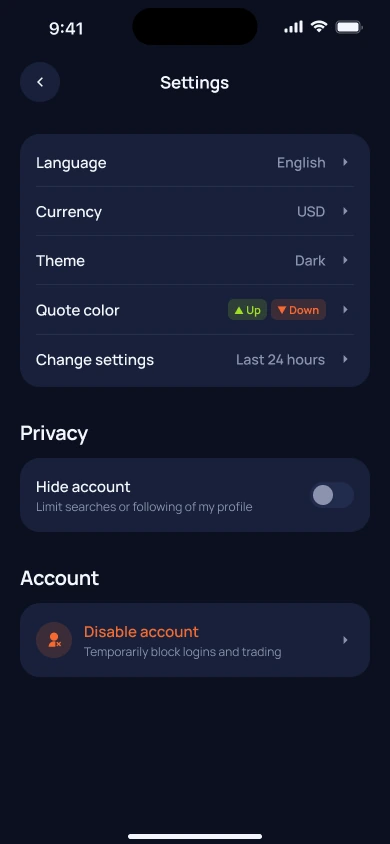
Account info and VIP progress in one card, with quick access to the most used functions. Risky actions like Disable account are moved to Settings.
Conversion
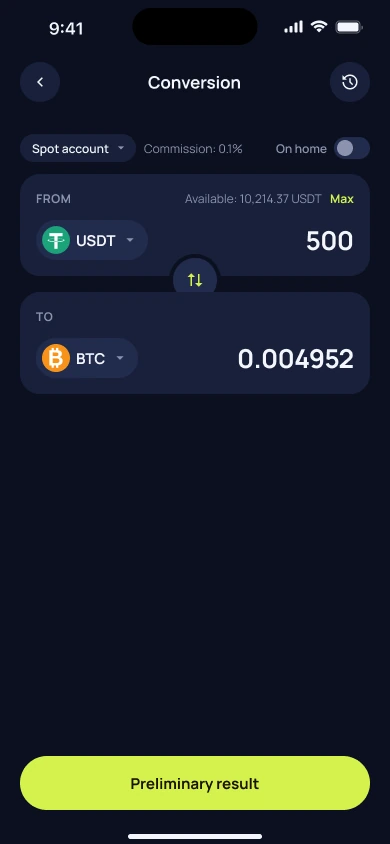
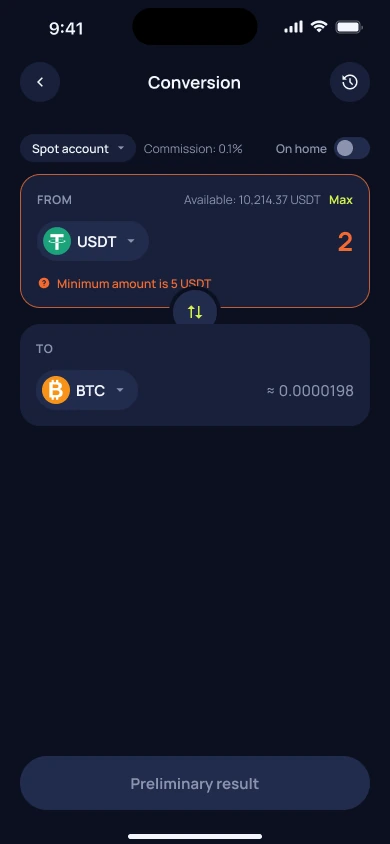
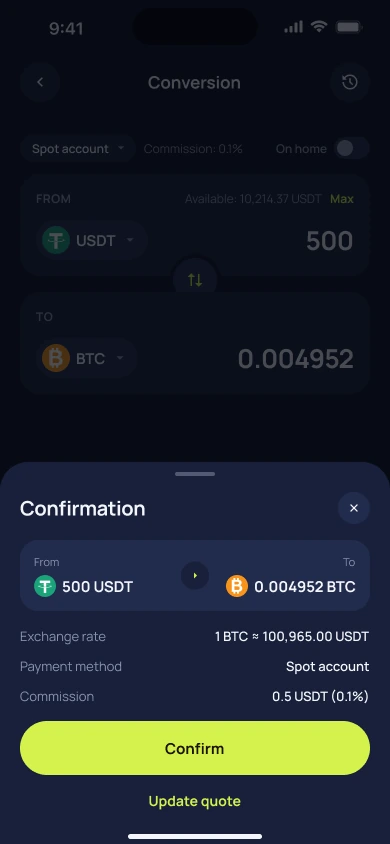
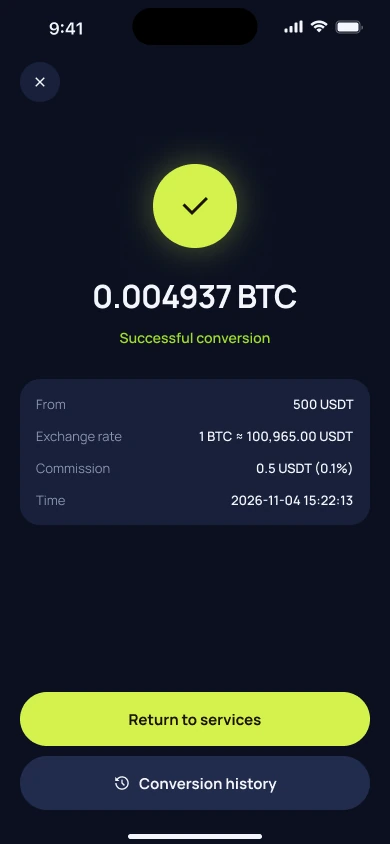
Swap one coin for another in one screen, with a clear error, a confirmation step and a success screen.
Visual style
Dark navy background and one bright lime color for the brand and main buttons. Price up and price down have their own colors, so the brand color never mixes with profit and loss. One font, Manrope, and one set of icons. Clear spacing: 32 between blocks, 12 inside a block. The name Bitlime comes from bit + lime, so the name and the colors work together.
How to measure success
The app hasn't launched yet, so these are the numbers I designed for:
- ActivationHow many users make a first deposit after signing up.
- Time to first actionHow fast people go from opening the app to their first deposit or trade.
- Drop-offWhere people leave the deposit flow, especially at network selection.
- Sign-up rateWhether the locked-balance screen brings more registrations than a regular promo banner.